Unified Communications Platform
Enterprise UC platform integrating voice, video, messaging, presence, and collaboration tools into a unified user experience.
Death by a Thousand Apps
The average knowledge worker switches between 4-6 communication apps daily. Voice on one platform, video on another, chat on a third — fragmented tools create fragmented teams.
Tool Switching Kills Productivity
Every context switch between communication apps costs 10-15 minutes of focus recovery. Employees spend 2+ hours per week just navigating between phone, video conferencing, chat, and email.
No Single View of Availability
Is the colleague available? Their phone shows busy, their chat says away, their calendar says free. Without unified presence, every attempt to reach someone is a guess — leading to missed connections and unnecessary meetings.
Disconnected Collaboration
A project discussion starts in email, moves to chat, escalates to a video call. But the context is lost at each transition. No shared history, no continuity, no collective understanding. The team spends more time syncing than working.
Six Pillars of Unified Communications
One platform that brings together every way your team communicates
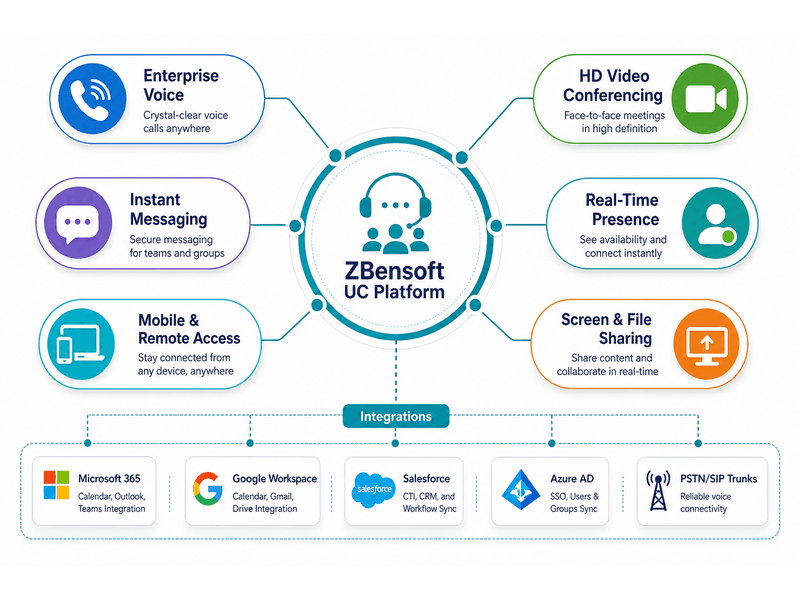
Enterprise Voice
HD voice calling with extension dialing, call transfer, conferencing, and PSTN connectivity. Your office phone number works everywhere — desk phone, softphone, or mobile app.
HD Video Conferencing
One-click video calls with screen sharing, virtual backgrounds, and meeting recording. From 1:1 catch-ups to all-hands town halls with hundreds of participants.
Instant Messaging & Chat
Persistent chat rooms, direct messages, file sharing, and threaded conversations. Searchable message history across all conversations — no more digging through email.
Real-Time Presence
See who is available, busy, in a meeting, or offline — in real time, across the entire organization. One presence status follows the user across phone, chat, and video.
Screen & File Sharing
Share your screen, a specific application window, or files instantly from within any conversation. Collaborative annotation and remote control during support sessions.
Mobile & Remote Access
Full UC functionality on iOS and Android. Take your office extension, chat history, and meeting links anywhere. Seamless handoff between mobile and desktop.
A Day With Unified Communications
How UC transforms a typical workday — from fragmented app-switching to seamless flow
Start the Day
Log in once. Presence automatically updates to Available. Check team chat for overnight messages, review shared calendar, join the morning video call — all from one app.
Collaborate in Flow
A chat message escalates to a voice call, then to a video call with screen sharing. Throughout, the conversation context stays in one thread. No app switching, no lost context.
Work From Anywhere
Take a call on the mobile app while commuting. Continue the conversation on the desktop when at the desk. Presence updates automatically — colleagues always know how to reach you.
End the Day
Review missed calls and voicemail delivered to email. Catch up on chat threads from meetings you missed. Set presence to Away. Tomorrow picks up where today left off.
Business Impact
Measurable productivity gains when organizations unify their communications
Persistent chat, presence, and quick voice calls resolve questions that would otherwise become 30-minute meetings. Organizations report 30-45% fewer scheduled meetings.
When the right person is one click away on any channel, decisions happen in minutes instead of days. UC eliminates the "waiting for email response" bottleneck.
Replace 4-6 separate communication apps with one platform. Reduced licensing costs, simplified IT management, and one vendor relationship to maintain.
Eliminated app-switching, faster colleague reachability, and integrated workflows recover hours of lost productivity per employee every week.
Deployment Flexibility
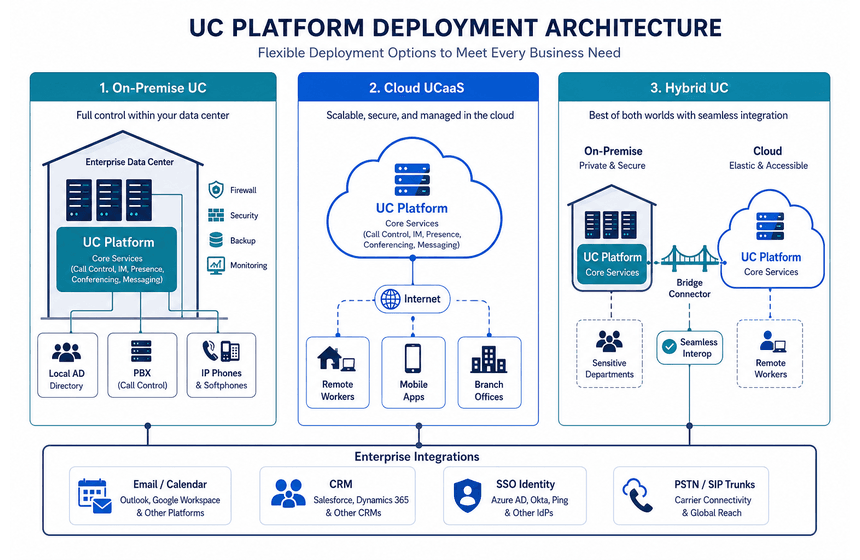
ZBensoft UC deploys on your terms — on-premise, cloud, or hybrid with full feature parity
On-Premise UC
Complete UC platform deployed in your data center. Full control over data, security, and infrastructure. Integrates with existing Active Directory and on-premise PBX.
Cloud UCaaS
Unified Communications as a Service. Zero infrastructure, per-user monthly pricing, automatic updates. Deploy across the organization in days, not months.
Hybrid UC
Core services on-premise for data-sensitive departments, cloud UC for remote workers and branch offices. Seamless interop between on-premise and cloud users.
Integrates With Your Ecosystem
ZBensoft UC connects with the tools your team already uses
Email & Calendar
Deep integration with Microsoft 365 and Google Workspace. Schedule meetings, check availability, and join calls directly from your calendar.
CRM & Business Apps
Screen-pop customer records during calls. Log call activity in CRM automatically. Click-to-call from Salesforce, HubSpot, and Zoho.
SSO & Identity
Single sign-on with Microsoft AD, Okta, Azure AD, and SAML providers. One set of credentials for all communication tools — simplified access management.
Compliance & Archiving
Call recording, chat archiving, and e-discovery support for regulated industries. SOC 2, HIPAA, and GDPR compliance with configurable retention policies.
Frequently Asked Questions
Can UC replace our existing phone system?
Yes. ZBensoft UC includes a full enterprise voice platform with PBX features — extension dialing, call transfer, auto-attendant, voicemail, and PSTN/SIP trunking. You can replace your legacy PBX entirely or integrate UC voice alongside it during migration.
How does UC handle security and encryption?
ZBensoft UC encrypts all communication channels: voice calls via SRTP, video via DTLS-SRTP, chat messages via TLS in transit and AES-256 at rest. File sharing includes malware scanning and DLP policies. Administrative controls allow IT to enforce encryption policies, manage external communication permissions, and audit all communication activity.
Can UC work with Microsoft Teams or should we use one or the other?
ZBensoft UC integrates with Microsoft Teams rather than competing with it. Teams users make external PSTN calls through UC voice via Direct Routing. Team chat rooms can federate with UC chat. Calendar presence syncs bidirectionally. Use Teams for internal collaboration and UC for enterprise voice, contact center, and compliance — or use UC as a complete alternative with lower total cost.
Full-Stack Technology for Your Telecom Business
ZBensoft integrates charging, core network, and AI capabilities to help operators run efficiently and grow sustainably.
Request a Demo